
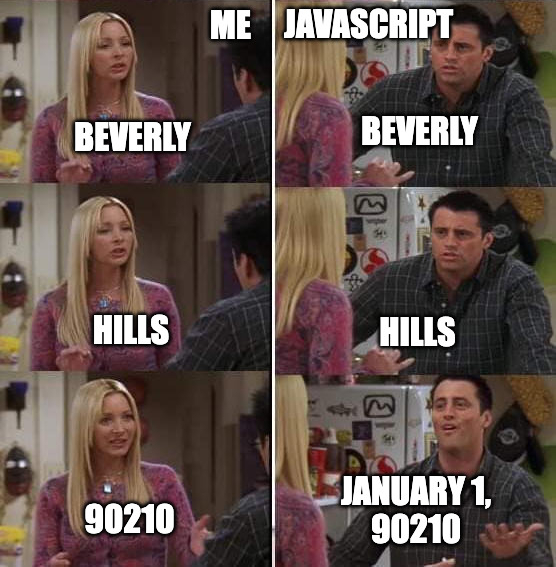
If you work with dates in JavaScript, you've probably reached for new Date(someString) at some point. It's convenient: pass in a string, get back a Date object. But coming from Python, I was surprised by how liberal JavaScript is about date formats. Allow me to illustrate with a few examples.
new Date("2020-01-23")
// Wed Jan 22 2020 19:00:00 GMT-0500
Makes sense. ISO format, midnight UTC, so it shows up as January 22 in the Western Hemisphere.
new Date("Today is 2020-01-23")
// Thu Jan 23 2020 00:00:00 GMT-0500
OK, it pulled the date out of a sentence, which might be helpful in some cases. And interestingly, the time shifted, which is a little odd.
new Date("Route 66")
// Sat Jan 01 1966 00:00:00 GMT-0500
It thinks "Route 66" is referring to the year 1966? That's definitely a stretch.
new Date("Beverly Hills, 90210")
// Mon Jan 01 90210 00:00:00 GMT-0500
Year 90,210? Are you kidding me?!
The parser can flat out fail, in which case the constructor produces an invalid Date object which is easy to check for. But in these examples, its producing valid but incorrect Dates, which are harder to detect in code.
What on Earth is going on?
Believe it or not, these aren't bugs! The parser is working as designed. Or well, "designed."
The ECMAScript spec only requires new Date() to parse one format: a subset of ISO 8601 (like "2025-11-06" or "2025-11-06T10:30:00Z"). For anything else, the spec says the behavior is "implementation-defined." In practice, both V8 (Chrome, Edge, Node.js) and SpiderMonkey (Firefox) have legacy parsers that try very hard to extract a date from whatever you give it. (Safari's JavaScriptCore engine is different. We'll get to it below.)
In V8's implementation, the rules are roughly:
- The engine first tries to parse the string as ISO 8601. If the string doesn't start with a four-digit number or a sign character, the ISO parser gives up immediately.
- Control passes to the legacy parser, which scans through the string token by token. Any unrecognized word that appears before the first number is silently ignored.
- Numbers that aren't followed by a colon (which would make them a time component) get fed to a
DayComposerthat assembles year, month and day.- A single number in the range 1-12 is treated as a month.
- Numbers in 13-31 are ambiguous (day without a month?) and cause the parser to reject the string.
- Numbers 32 and above are treated as years. 50-99 have 1900 added to them to accommodate the two-digit year convention.
- Month and day default to 1 if not provided.
This means
new Date("Route 66")happily returns January 1, 1966, because 66 is above 31 and triggers the two-digit year rule.new Date("Beverly Hills, 90210")works too. 90210 is well above the two-digit range, so it's used as-is: Year 90210, January 1st.- But
new Date("Catch 22")returnsInvalid Datesince 22 is in the dead zone between 13 and 31. Thank goodness! Converting"Catch 22"to a date would be absurd!
Timezones make it even worse
There's a subtler problem: the two parsers have different rules regarding time zones. The spec says that date-only ISO strings like "2020-01-23" should be parsed as UTC. But the legacy parser defaults to local time. This means:
new Date("2020-01-23")
// Wed Jan 22 2020 19:00:00 GMT-0500
// UTC midnight is Jan 22 in the Western Hemisphere

new Date("Today is 2020-01-23")
// Thu Jan 23 2020 00:00:00 GMT-0500
// local midnight, so day remains Jan 23
Same calendar date in the string but different output. The first hits the ISO parser (UTC). The second starts with "Today", which causes the ISO parser to bail, so the legacy parser handles it (local time). Even a leading or trailing space character is enough to cause the legacy parser to kick in.
Safari
Safari's JavaScriptCore engine is much stricter. It rejects the pathological examples above. It even rejects trailing whitespace (though leading whitespace is allowed for some reason).
The irony is that a comment in the V8 source code blames Safari as the source of this legacy nonsense.
// Accept ES5 ISO 8601 date-time-strings
// or legacy dates compatible with Safari.
I guess Safari decided to wash its hands and move on. But Chrome and Firefox are still living in the past.
How this caused a bug
We had a function that tried several regex-based date parsers, then fell back to new Date() for anything that didn't match. The fallback was meant to be a safety net for date formats we hadn't anticipated. Instead, it was silently converting arbitrary text into dates. Users saw table cells where street names and identifiers were showing up as formatted dates.
The fix was removing the fallback. Our explicit parsers already handled the formats we needed. If something didn't match a known pattern, it wasn't a date.
Python gets this right
It's worth comparing to Python's approach. Python's standard library has no equivalent to new Date(string). There is no function that takes an arbitrary string and tries to guess whether it contains a date.
datetime.fromisoformat() only accepts ISO 8601. Everything else raises ValueError. datetime.strptime() lets you parse other formats, but it's still very strict. It doesn't even allow extra whitespace.
This follows the Zen of Python: "In the face of ambiguity, refuse the temptation to guess." JavaScript's legacy date parser takes the opposite approach, guessing aggressively and silently returning plausible-looking wrong answers. A loud error is almost always preferable to a silent wrong answer.
Picking up the pieces
Only call new Date(string) when you control the input format and know it will be parsed the way you expect. For user-supplied data, validate the format with a regex first or use a strict parser like date-fns's parseISO(). Switch to Temporal if it has wide enough support for your use-case. Don't treat the Date constructor as a validator.
And if you're designing what will become the world's most popular programming language, at least make the date parser reject TV show titles.
FutureSearch lets you run your own team of AI researchers and forecasters on any dataset. Try it for yourself.