
Yesterday we reported that litellm versions 1.82.7 and 1.82.8 on PyPI contained malware that exfiltrates credentials and attempts lateral movement across Kubernetes clusters. PyPI quarantined both versions within 46 minutes.
We queried the BigQuery PyPI dataset for every package that lists litellm as a dependency, cross-referenced each against the PyPI API for release timing, and checked deps.dev for downstream dependent counts. We also built an interactive checker where you can look up any package.
2,337 packages on PyPI depend on litellm. 2,054 (88%) had version specs that allowed the compromised versions at the time of the attack. 283 (12%) were pinned to a safe version or upper-bounded below 1.82.x. During the 46-minute window, the two malicious versions were downloaded 46,996 times.
Timeline
| Time (UTC, Mar 24) | Event |
|---|---|
| 10:39 | litellm 1.82.7 published - payload in proxy_server.py, exfil to checkmarx[.]zone/raw |
| 10:52 | litellm 1.82.8 published - .pth file, exfil to models[.]litellm[.]cloud |
| 11:25 | PyPI quarantines both versions |
46 minutes. The attacker uploaded both versions through a compromised maintainer account. Neither has a corresponding tag or release on the litellm GitHub repository.
46,996 downloads in 46 minutes
We queried BigQuery's PyPI download logs for litellm installs during the attack window:
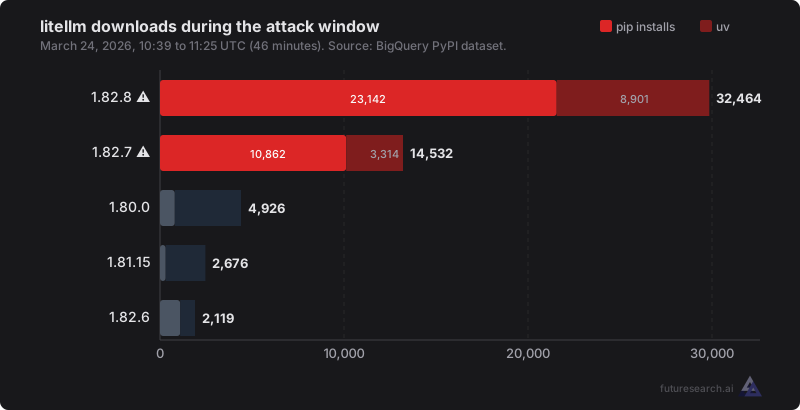
The malicious versions dominated. 1.82.8 was downloaded 6x more than any safe version. Safe versions skew toward uv (lock files pinning to a known version). The malicious versions skew toward pip (resolvers picking the latest).
Every pip install of 1.82.8 executed the payload. The .pth file ran during installation itself. The 23,142 pip installs of 1.82.8 represent 23,142 environments where the malware ran before any application code.
1.82.7 and 1.82.8 are different attacks
They target different vectors and exfiltrate to different C2 servers.
1.82.8 included a .pth file (litellm_init.pth). Python executes .pth files on any interpreter startup, including during pip install itself. If your resolver picked 1.82.8, the payload ran before your application had any chance to intervene. The act of installing was enough. Exfiltration target: models[.]litellm[.]cloud.
1.82.7 injected a payload into proxy_server.py that drops a secondary script p.py. It triggers only when litellm.proxy is imported, primarily affecting proxy server deployments, not general SDK usage. Exfiltration target: checkmarx[.]zone/raw.
Both payloads harvest the same material: SSH keys, cloud credentials (AWS/GCP/Azure), .env files, Kubernetes configs, crypto wallets, shell history, environment variables.
A CI pipeline that ran pip install litellm during the window and resolved to 1.82.8 was compromised even if it never executed application code. A developer on 1.82.7 who only used the SDK (never imported litellm.proxy) was not affected.
Who was at risk
Three categories:
Direct installs. Anyone who ran pip install litellm or uv add litellm during the 46-minute window. Developers upgrading locally, CI/CD pipelines rebuilding environments, Docker builds pulling fresh deps, cloud dev environments spinning up. If the resolver picked 1.82.8, the malware ran during installation.
Libraries with unpinned litellm deps. A developer installs some-library, pip resolves its litellm dependency to the latest version, and the malware executes. The developer may not know litellm is in their dependency tree. Each affected library multiplies the blast radius by its own install base.
Applications with unpinned litellm deps. Same mechanism, but the risk is limited to direct installs of the application during the window. No transitive multiplication.
Version pinning determines exposure
Your litellm version specifier decided whether the resolver could pick 1.82.x:
litellm==1.80.0- Safe. Resolver installs exactly 1.80.0.litellm>=1.0,<1.82- Safe. Upper bound excludes 1.82.x.litellm>=1.80- Exposed. No upper bound.litellm>=1.0,<2.0- Exposed. 1.82.x satisfies<2.0.litellm- Exposed. No constraint.
The 2,337 packages break down as follows:
| Category | Count | % | Status |
|---|---|---|---|
No constraint (litellm) | 283 | 12% | Exposed |
Lower bound only (>=X) | 1,388 | 59% | Exposed |
| Upper-bounded but range includes 1.82.x | 383 | 16% | Exposed |
| Upper-bounded, excludes 1.82.x | 74 | 3% | Safe |
Pinned to safe version (==X.Y.Z) | 209 | 9% | Safe |
88% of packages that depend on litellm would have resolved to a compromised version during the attack window.
Lock files (uv.lock, poetry.lock, pip-compile output) prevent the resolver from picking a new version. If your lock file predates the attack window and you didn't regenerate it during those 46 minutes, you were safe regardless of the version specifier in pyproject.toml.
Lock files protect your builds. They don't protect your consumers. If you publish a library with litellm>=1.0 in its metadata, anyone who installs your library fresh gets the latest compatible litellm.
Note on methodology: This analysis covers direct dependencies on litellm only. We did not trace transitive exposure, where a package depends on something that depends on litellm. The true blast radius is larger. A popular framework pulling in litellm unpinned means every package depending on that framework was also exposed during the window.
Check your packages
We built a tool for this: futuresearch.ai/tools/litellm-checker
Enter a PyPI package name. It checks our precomputed analysis of all known litellm dependents. If the package isn't in our dataset, it falls back to a live PyPI API check.
How to check manually
1. Is litellm in your environment?
pip show litellm
2. Check your cache for the malicious .pth file:
find ~/.cache/uv -name "litellm_init.pth" 2>/dev/null
find ~/.cache/pip -name "litellm_init.pth" 2>/dev/null
3. Check for persistence:
ls -la ~/.config/sysmon/sysmon.py 2>/dev/null
ls -la ~/.config/systemd/user/sysmon.service 2>/dev/null
4. Kubernetes - check for unauthorized pods:
kubectl get pods -n kube-system | grep node-setup
If you find any of the above, assume all credentials on the machine are compromised. Rotate SSH keys, cloud provider credentials, API keys, and database passwords.
.pth files as an attack vector
.pth files are part of Python's site-packages machinery. Any file matching *.pth in a site-packages directory can contain one line of executable Python. It runs on every interpreter startup: before imports, before your code, before anything.
The 1.82.8 attacker used this to execute before the user's application could intervene. pip install itself starts a Python interpreter, so the .pth file ran during installation. The .pth launcher then spawned a child process via subprocess.Popen, but because .pth files trigger on every interpreter startup, the child re-triggered the .pth, creating an exponential fork bomb. The fork bomb is a bug in the malware. It's what made the attack visible.
Part of a broader campaign
Snyk's Poisoned Security Scanner Backdooring LiteLLM traces the method: a malicious Checkmarx security scanner backdoored litellm. The exfiltration domain checkmarx[.]zone in the 1.82.7 payload is a typosquat of the legitimate Checkmarx security vendor.
Rami McCarthy's analysis of the coordinated disclosure suppression found 76% account overlap between the bot accounts that flooded the litellm GitHub issue and the botnet that suppressed earlier Trivy vulnerability disclosures. The same network ran both operations.
The attacker holds SSH keys, cloud provider credentials, API keys, and Kubernetes configs from every compromised environment. PyPI yanked the malicious versions. The stolen secrets remain valid until someone rotates them.
Trusted Publishers would have prevented this
PyPI's Trusted Publishers ties package uploads to specific CI workflows. If litellm had used Trusted Publishers, the attacker would have needed to compromise the GitHub Actions workflow, not just a PyPI API token.
Sigstore attestations go further: a cryptographic chain from source commit to published artifact. Both are free. Every package maintainer should enable them.
Analysis produced using BigQuery's public PyPI dataset, the PyPI JSON API, and deps.dev. Interactive checker available. Original disclosure: Supply Chain Attack in litellm 1.82.8 on PyPI.