
September 2026: the operation on this page (merge) is deprecated and will be removed. There is no drop-in replacement for merging or deduplicating tables; agent_map can research each row, and the deprecated call keeps working for now.
You exported two HubSpot contact lists, but merging them in Excel fails because emails are formatted differently, names have variations, and company fields don't match. HubSpot's native merge only works on exact email matches. This tutorial shows how to use AI-powered matching to merge contact lists when standard identifiers don't align. We matched 1,000 contacts across two lists for $5.10, including cases where the same person had different email domains.
My Problem
When hiring for FutureSearch, I did some scaled web research to find candidates. I used different overlapping methods, for example I searched by academic papers, and also by githubs. It's easy to end up in a situation like this, where you have two lists that needed to be joined:
- 1,176 candidates with name, email, lab name, and position
- 1,074 candidates with name, email, university, and GitHub handle
Most of these were the same people. But less than half of them matched exactly by either name or email. If I merged them naively, I'd end up sending a lot of people a recruiting email to both their personal and their academic email.
Here are two examples of what I now know were the same person:
List 1 | List 2 |
|---|---|
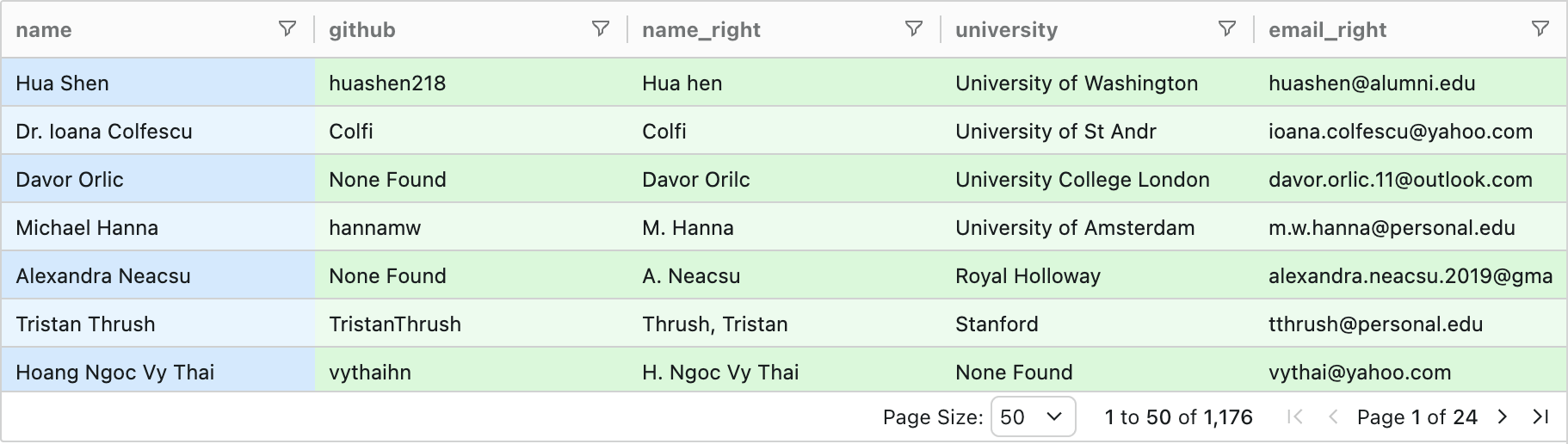
Hua Shen / huashen@uw.edu | Hua hen / huashen@alumni.edu |
Dr. Ioana Colfescu / ioana.colfescu@ncas.ac.uk | Colfi / ioana.colfescu@yahoo.com |
Names had typos ("Hua hen"), some names were GitHub handles ("Colfi"), emails were from different domains (work vs. personal), and some records were missing fields. There were also other fields like university vs. university lab + job title that were clues to the match. When I Googled the rows, I could generally figure it out.
So it felt like a problem an LLM + websearch approach could solve. I ended up solving this with FutureSearch tech, but along the way I learned what people normally do in this situation.
The simplest approach is to use VLOOKUP in a Excel / Google Sheet, and do an exact match on emails, then an exact match on names. But too many records had neither the name or the email match! And exact matches on names would lead to a large number of false positives.
The next simplest approach is fuzzy string matching, like using Levenshtein distance, or tools like fuzzywuzzy. The problem is no threshold works well enough.
- Threshold too strict (above 0.9): Misses "Dr. Ioana Colfescu" ↔ "Colfi"
- Threshold too loose (below 0.7): False positives everywhere like "John Smith" matches "Jane Smith"
The thing I really wanted was LLMs. But there was no clear way to do this in any less than hundreds of LLM calls with a lot of false positives & false negatives, until we built one.
LLM-Web-Agent Powered Merge
Using futuresearch.ai/merge cost $5.10 and took 12 minutes. (Clever choice of comparisons, model selection, caching, and judicious use of websearch are very important to avoid extremely high costs.) I then checked the results manually (since we did end up contacting many of these sourced job candidates), and here is what I found:
Metric | Value |
|---|---|
True matches found | 770 of 771 (99.9%) |
False positives | 35 |
False negatives | 1 |
Cost | $5.10 |
FutureSearch found 770 of the 771 true matches, including the aforementioned difficult cases like "Dr. Ioana Colfescu" matching to "Colfi" (her GitHub handle) and "Hua Shen" matching to "Hua hen" (a typo).
The 35 false positives fell into a few categories. Most involved common surnames like Wu, Li, Liu, Zhang, Wang, Xu, Gupta, or Khan:
List 1 | List 2 |
|---|---|
Kaidi Xu / xukd2015@gmail.com / (no org) | Kai Xu / kxu@personal.edu / Max Planck Institutes |
A couple were caused by GitHub organization names matching institution names:
List 1 | List 2 |
|---|---|
Jimmy Chen / jchen160@meei.harvard.edu / Harvard AI and Robotics Lab | Dr. Menngyu Wang / (no email) / GitHub: Harvard-AI-and-Robotics-Lab |
In each case, the LLM or the web search found multiple weak signals that aligned, but coincidentally.
The 1 missed match was "Evgenii Opryshko" who should have matched to "ktolnos" (his GitHub handle). With no string similarity between the name and handle, this requires web research to solve. Others in this list worked, but FutureSearch failed on this one for some reason, possibly an issue with the agent reading a webpage like LinkedIn.
Try it yourself
If you have lists of names you'd like to merge, and you'd like more intelligence than other tools, FutureSearch will do up to 200 (in each list) for free, in less than 10 minutes start to finish. Larger lists can also be done for just a few dollars, like in this case. Just go to futuresearch.ai/merge, upload the two datasets as CSVs or from Google Sheets, and watch the merge, and then export to CSV or Google Sheet.