
September 2026: the operations on this page (classify and rank) are deprecated and will be removed. They still work for now. For a label or a score per row, use agent_map with a response model.
Simple filters work when you have one criterion. But real screening requires logic: "Include if (high revenue AND US-based) OR (any revenue AND strategic market)." Excel's filters can't handle this complexity, especially when criteria are qualitative. This tutorial shows how to build a multi-step screening workflow that applies complex logic to filter your data, even when the criteria require judgment rather than exact values.
The problem: screening is iterative, but most tools price it like it isn't
Clay is great at giving you a result. The problem is getting to the result you actually want without burning money along the way.
In my case, the challenge wasn't scoring. It was screening with a rule that reflects how I think about sales effort and who's reachable, and then being able to iterate on that rule without paying for it each time.
Clay has an auto-run setting for each column. When it's on, any time you add a new row or change an input, it automatically runs the enrichment and burns credits. When it's off, your data goes stale and you have to remember to manually trigger updates.
The problem is there's no middle ground. I wanted my tables to stay current when I'm actively working on them, but I didn't want enrichments running every time I pasted in a new batch of firms to explore. I kept accidentally burning credits on rows I wasn't even sure I wanted to keep.
And the setting is per-column, not per-table.
Another problem: failures are expensive
Looking at my Funds table, warning triangles are scattered across the "Current job openings?" column. Enrichments that failed or returned no data. I paid for those attempts anyway.
These failures still cost credits. And the outputs can be strange. One fund showed over 200 currently posted jobs, which immediately made me skeptical of the accuracy, but that's a whole separate post.
The screening logic I actually needed
It's a simple filter job to rank by contrarian score (I used futuresearch.ai/rank) and then filter out any funds with a contrarian score < 70. Clay handles that.
The part that got painful (and expensive) was the next step: removing funds that show no signal of ever buying research tools unless they're a very small fund.
I'm interested in funds with minimal teams. If the CEO is the sole fund manager, or there are 2 co-founders, or the team is less than 5 people, those funds could be easier to reach. This is my mental model, but it's not everyone's, and that makes screening hard for most CRMs.
Most tools would force me to break this into multiple steps: first filter by team size, then separately filter by research tool score, then somehow merge the results. Or I'd have to build complex conditional logic.
How I did this with our tool
In FutureSearch, I just described what I wanted:
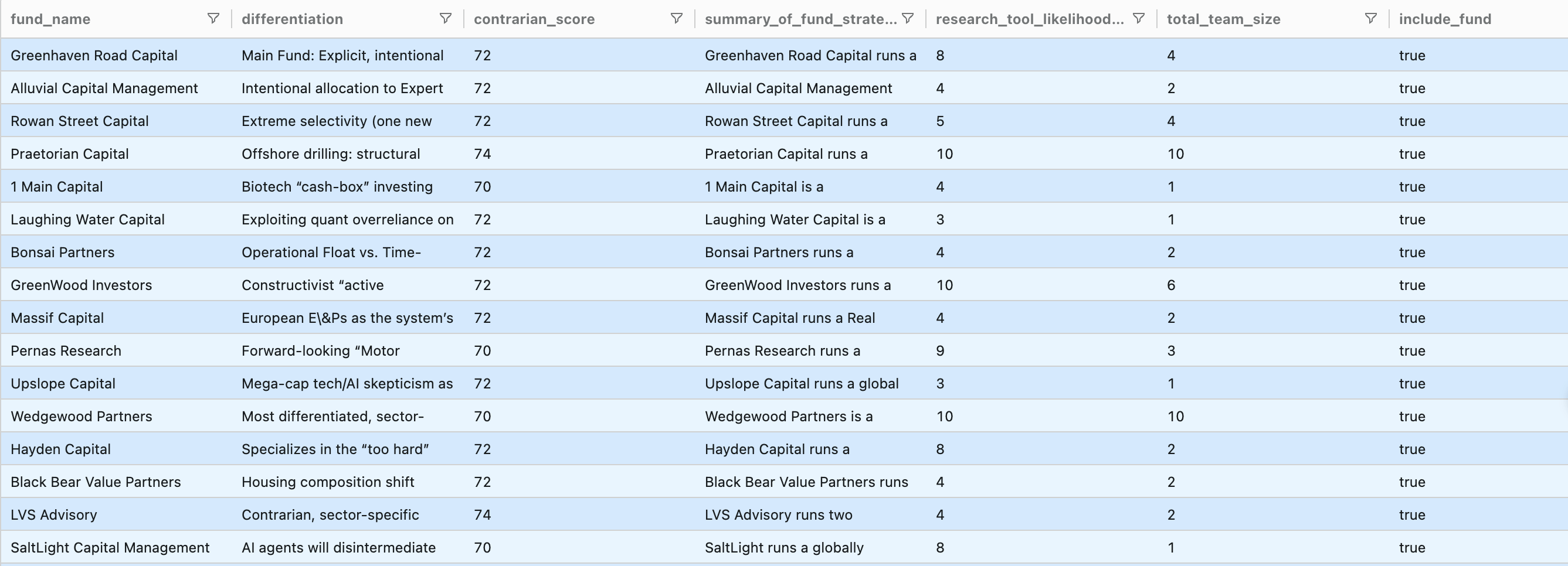
"Research total fund team size and create a flag for funds to include based on research tool likelihood of 6+ OR total team size less than 5."
The tool added two columns: total_team_size and include_fund.
The include_fund flag captures the screening logic in one place: include funds with strong research-tool signals, or include very small teams even if signals are weak.
If you have your own messy list-filtering problem, try it on your data here: futuresearch.ai/classify